

Overview
What is MCP? The Model Context Protocol (MCP) allows Claude, Cursor, and other AI assistant systems to access external tools and data sources through specialized servers, breaking free from their inherent limitations. At Notte, we’ve developed an MCP server implementation focused specifically on browser control, enabling you to ask Claude or Cursor to act on your behalf on the web directly from the chat interface.Notte-MCP: Browser Control for AI Agents
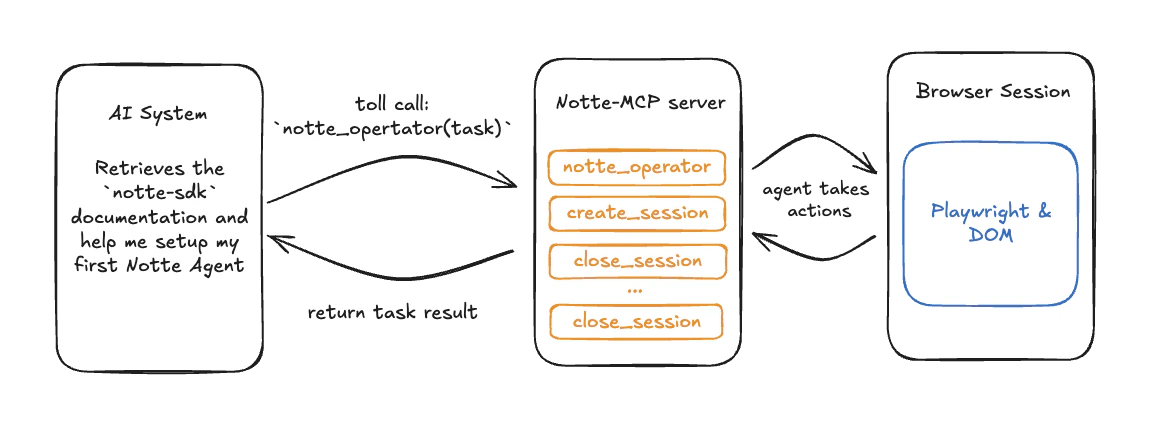
- Enhanced coding assistance through real-time documentation access
- Access Stack Overflow answers and Hacker News discussions
- Automated form completion for repetitive tasks with built-in authentication
- Download files and resources from specified websites
- Data collection from websites without available APIs
- Streamlined research workflows with AI-assisted browsing
Setup: How to Integrate Notte with MCP Server
1
(Optional) Running the MCP Server Locally
Follow these steps in your terminal to install and run your Notte-MCP server:
2
Set up your Claude Desktop configuration to use the server
3
Restart Claude Desktop
Restart your Claude Desktop app, and you should see the tools available by clicking the 🔨 icon.
4
Start Using the Tools
Start using the tools! Below is a demo video of Claude performing a Google search for OpenAI using the Notte MCP server for a remote headless browser.